onDidChangeTextEditorSelection 함수는 커서 위치가 변경되면 이벤트가 발생
onDidChangeActiveTextEditor 함수는 활성 편집기가 변경되는 이벤트
파라미터
1
2
3
4
5
A function that represents an event to which you subscribe by calling it with a listener function as argument.
@param listener — The listener function will be called when the event happens.
@param thisArgs — The this-argument which will be used when calling the event listener.
@param disposables — An array to which a disposable will be added.
@return — A disposable which unsubscribes the event listener.
코드를 이해하면서 봐야하는데…
로그찍어서 확인해보니 onDidChange* 함수가 실행되면 this._onEvent 가 실행되서 updateWordCount() 가 됩니다.
// Use the console to output diagnostic information (console.log) and errors (console.error). // This line of code will only be executed once when your extension is activated. console.log('Congratulations, your extension "WordCount" is now active!');
// create a new word counter let wordCounter = newWordCounter(); let controller = newWordCounterController(wordCounter)
// Add to a list of disposables which are disposed when this extension is deactivated. context.subscriptions.push(wordCounter); context.subscriptions.push(controller);
}
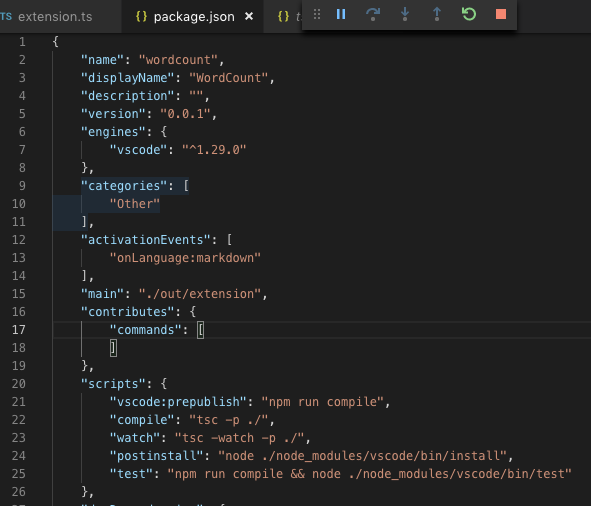
json 파일도 수정해줍니다. activationEvents 안에 onLanguage:markdown 설정을 해줍니다.
onLanguage:${language} 이벤트는 언어 ID 를 사용하며 해당 언어의 파일이 열리면 발생합니다.